
AI agents that help run your business
Insights alone don’t move work forward. Operate more efficiently and unlock revenue growth with AI agents that can execute core business processes.
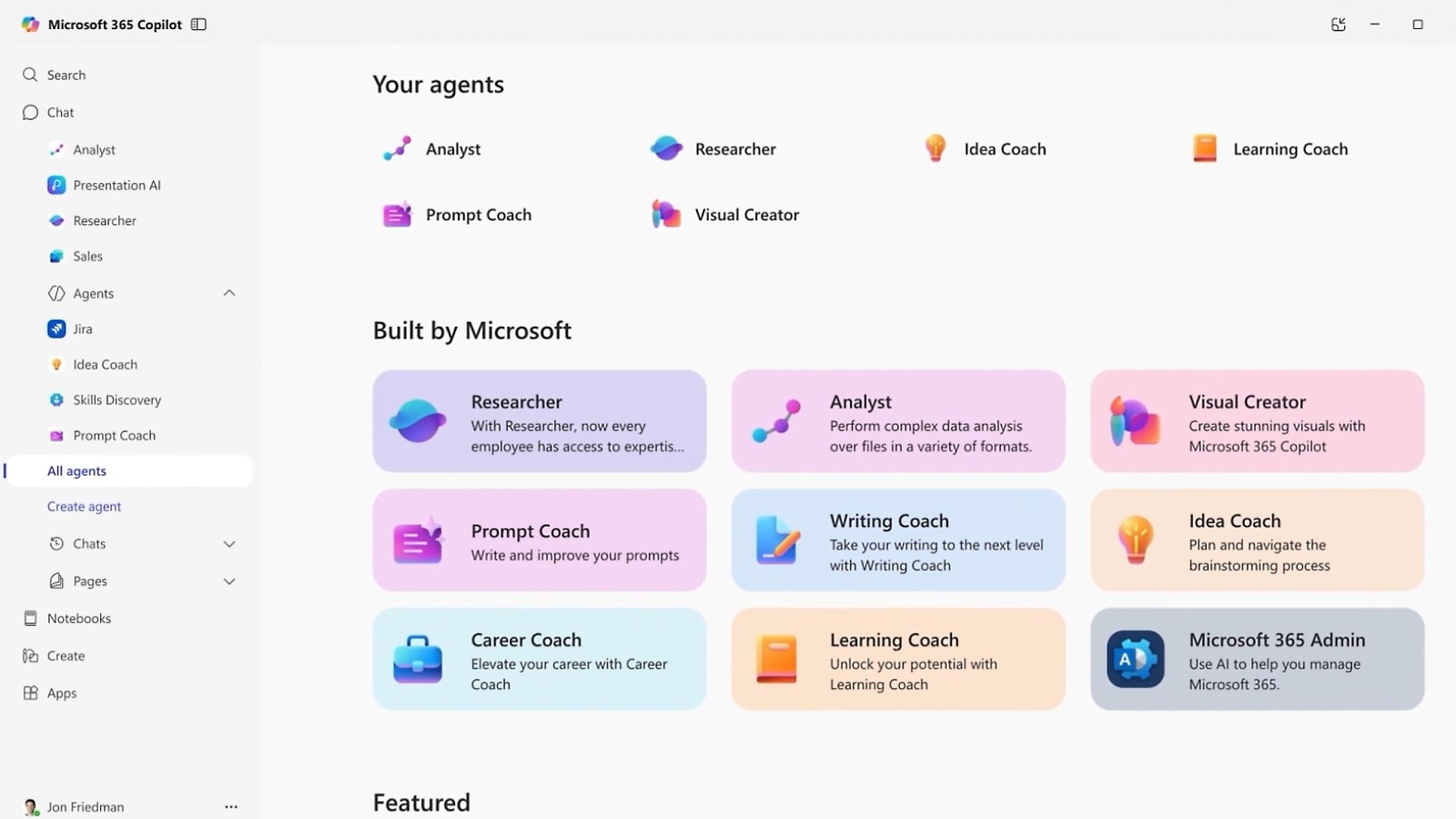
Agents purpose-built for business
Turn Copilot into an interactive workspace with agents. Use them to analyze Excel data, send an email, update records in your go-to work apps, and more—without leaving the chat.
Say goodbye to generic AI assistance. Tap into the intelligence layer that gives Copilot and agents the context needed to fine-tune every output to you, your job, and your company.
Have peace of mind with Agent 365, the end-to-end control plane where you can observe, secure, and govern every agent across your entire organization—all in one place.
Introducing Microsoft Agent 365
Meet the control plane, where IT can observe, secure, and manage your organization’s agents—all in one place.
Transform your business with agents by Microsoft
Discover how the right agents can transform the way your team gets work done.
Use agents to boost productivity
Agents in Microsoft 365 Copilot help with everyday tasks and processes. All agents are included with a Copilot license.
Tackle complex, multistep research across your work data and the web
Researcher securely reasons, researches, and executes across public and gated web content to uncover deeper insights, act, and create richer reports—all grounded in your org’s data and the web.
Go from raw data to insights in minutes
Analyst uses a research model optimized for data analytics to help make sense of your complex data in moments.
Quickly find and connect with colleagues
The People Agent surfaces all people-related insights in one place, helping you quickly find colleagues based on role or skills, view top collaborators, and prepare for upcoming meetings or conversations.
Build working apps in minutes
Streamline tasks with custom apps built by you and your team and grounded in your work data—ready to use and easy to share.
Automate personal and team workflows quickly
Boost productivity for yourself and your team, without switching apps. Workflows Agent helps you create, manage, and test workflows for Microsoft 365—right inside Copilot.
Make informed workforce planning decisions
Use the agent to get real-time answers and detailed reports about your organization, helping you optimize team composition, monitor hiring trends, and improve organizational health—fast.
Stay ahead with personalized upskilling
Learning Agent helps train your workforce on important role-specific and AI skills, surfacing tailored tips, curated learning courses, and interactive role-playing exercises.
Boost operational agility across your organization
Agents bring Dynamics 365 directly into Copilot—connecting teams, simplifying data reviews, and streamlining processes. All without leaving the chat.
Focus your time on the highest priority sales opportunities
Dynamics 365 Sales Agent can research leads, help prioritize opportunities, and guide customer outreach.
Get valuable insights for fast, data-driven decisions
Build research plans, pull and analyze data, and generate visualizations right in Dynamics 365 Sales.
Reduces handle time and improves customer satisfaction
Simplify and streamline your case-management process with this Dynamics 365 Customer Service agent.
Provides tailored solutions for customer issues
This agent analyzes past interactions between customer service reps and customers to understand customer wants.
Get better visibility into cash flow and streamline the financial process
Automate transactions between subledgers and the general ledger with this Dynamics 365 Finance agent.
Transform the way purchasing professionals interact with suppliers
Reimagine supplier communications in Dynamics 365—enabling leaner, faster, and more accurate workflows.
How does an agent get to Microsoft 365 data?
Through the Work IQ API rather than by wiring up your own calls. Three endpoint types, so the choice comes down to what your agent runtime already speaks.
| A2A | Agent-to-agent collaboration. Agents delegate work to each other and maintain continuity. |
|---|---|
| Remote MCP server | The tool surface. Direct access to Microsoft 365 data plus the ability to act on it. |
| REST API | Web application interactions. |
Usage is independent of Microsoft 365 Copilot licensing and available through usage-based billing. Enterprise governance plus cost management controls are available in the Microsoft 365 admin center.
Licensing is the part that catches people out. Work IQ API access does not ride on a Copilot seat. For Copilot licensed users it is available in all Microsoft 365 Copilot experiences and agents, billed on usage for custom and third-party agents. Users without a Copilot license are billed on usage too. Cost is variable and gets managed in the Microsoft 365 admin center.
What a Copilot seat itself costs is a separate question: Copilot plans and pricing has the per-user figures. For the business read on Work IQ rather than the developer one, see Microsoft 365 Copilot, powered by Work IQ.
Capability detail from Microsoft’s Work IQ overview for developers, last updated June 17, 2026.
What does the Work IQ MCP expose?
Ten generic tools. The Work IQ MCP collapses hundreds of operations into that set, giving direct access to Microsoft 365 data plus the ability to act on it.
How the surface splits
Splitting verbs from paths is why the surface stays small while staying extensible as new data sources appear. You write against ten tools once instead of re-integrating every time another source lands.
Runtime discovery is the part worth reading twice. An agent needs no predefined model of your data to work with it. It can ask what exists, how it is organized and how to interact with it.
Where does an agent keep its working state?
In SharePoint Embedded working storage, inside your Microsoft 365 tenant boundary. Long-running workflows need somewhere to park intermediate data between steps. Workspaces are that somewhere.
Working storage holds intermediate data across the steps of a long-running workflow.
Outputs stay available for later steps in the same piece of work.
One agent’s outputs are reachable by the next agent or experience on the same task.
The boundary is the part IT asks about first. This is persistent space within your own Microsoft 365 tenant, holding intermediate data plus outputs while a workflow runs.
How are agent permissions enforced?
Not with hundreds of static OAuth scopes. The Work IQ MCP uses a small set of broad permissions to set high-level access boundaries, then a Rego-based policy engine enforces detailed, context-aware rules on every request.
What the policy engine evaluates per request
Actions are user scoped. Every request runs in the context of a specific user, reaching only what that user is allowed to see or do.
Every tool invocation is logged and evaluated, which is what makes auditability, usage analytics, rate limiting plus real-time compliance enforcement possible across agents and data sources.
How do Work IQ and Agent 365 fit together?
Work IQ is what an agent reads. Agent 365 is where a tenant decides whether it may. MCP servers are the join, which is why the same server list turns up in a builder conversation as well as an admin one.
| Inside Microsoft 365 | Agents built for Microsoft 365 apps, such as with Agent Builder in Microsoft 365 Copilot, do not require separate connectors like APIs or MCP servers to access Work IQ. |
|---|---|
| Outside Microsoft 365 | For custom agents, MCP servers are the primary mechanism for connecting those agents to Work IQ. |
| Per server | Each Work IQ MCP server represents a scoped slice of Microsoft 365 signals such as email, calendar, Teams activity or SharePoint content. |
Choosing servers is how a builder declares intent: which types of enterprise context the agent needs, how broadly it should reason across work signals, where governance boundaries apply.
How Microsoft states the control point
Our administrators decide which Work IQ MCP servers are enabled in the tenant and which of our builders are allowed to use them. This ensures that extending intelligence beyond Microsoft 365 remains a deliberate choice rather than an accidental one.
None of that widens what a request can reach. MCP servers enforce existing permissions, labels, and tenant policies, on top of the user-scoped authorization model above. Which admin owns which part of a running agent is a tenant question rather than a developer one: Agent 365 and the four admin roles has that split, and the permission-trimming detail sits on Work IQ in Microsoft 365 Copilot.
Extending Agent 365 onto your own agents
Developer Portal now supports management and configuration of Agent Blueprints allowing developers to extend Agent 365 capabilities to their agents including enterprise-grade identity, observability, notifications, security, and governed access to Microsoft 365 data.
Control-point wording from Microsoft Digital’s Inside Track account of running Work IQ. Agent Blueprints from the Microsoft 365 Copilot release notes, February 10, 2026.
Frequently asked questions
Agents are AI systems that help individuals and organizations manage tasks and make informed decisions. Using agents within Copilot, you and your business can drive efficiency and get more work done faster.
Agents can perform various tasks to assist people and organizations:
Retrieve information: Query systems like HR, CRM, or financial databases.
Help with basic tasks: Submit expense reports, update CRM systems, create IT help desk tickets.
Perform specialized roles: Facilitate meetings, compile research reports, analyze data sets.
Automate processes: Handle financial planning, sales qualification, and supplier communications.
You can create simple agents from Microsoft 365 Copilot, by selecting ‘New agent’ from the left pane. This experience allows you to create agents using natural language.
For more advanced scenarios, log in to Copilot Studio, which provides a low-code way to create powerful agents. You’ll start by grounding your agent in your data for knowledge. Then, add actions to your business systems so it can complete tasks. For critical topics, you can design agent flows for more control. Then get testing and iterating.
Agents are AI programs that are comprised of:
What it knows: The data the agent has access to and the memory it stores.
What it processes: The ability to analyze data, recognize patterns, make decisions, and learn over time.
What it can do: The actions it can take across the surfaces such as the apps and systems it has access to.
Traditional AI models help individuals be more efficient. AI agents, however, can execute business processes. They range from simple prompt-and-response agents to advanced, fully autonomous agents that can complete entire workflows from start to finish. Agents can think or reason, remember, be trained, and even know when to ask for help. This makes them versatile tools for various business applications.
No. Work IQ API access is independent of Microsoft 365 Copilot licensing and available through usage-based billing. For Copilot licensed users, Work IQ is available in all Microsoft 365 Copilot experiences and agents, subject to usage-based billing for custom and third-party agents. Users without a Copilot license are billed based on usage. Cost is managed in the Microsoft 365 admin center. The endpoint table has the rest. Per-seat figures are on Copilot plans and pricing.
Microsoft says no, for a reason worth reading before anyone plans a rollout: connecting these servers to enterprise data represents real, but manageable, risk. They make existing permissions more actionable, which can amplify the impact of overshared content or weak data hygiene.
Microsoft’s stated best practice is to treat these servers as governed infrastructure: enable them selectively at the tenant level, start with the minimum set required for defined agent scenarios, restrict usage to approved builders, and pair expansion with regular permission reviews and labeling discipline.
Who holds that switch is the section above.
What we do alongside the licence
SoftSolutionWorks.com is backed by BlueAlly, an authorized Microsoft reseller. As well as supplying the licences, we can help you choose the plan, deploy it, and finance it.