
Microsoft 365 Business Standard
Get apps such as Word, Excel, and PowerPoint across devices, plus video editing, professional email, cloud file storage, online meetings, and AI-powered chat.
Choose the version that fits how your team works
Get apps such as Word, Excel, and PowerPoint across devices, plus video editing, professional email, cloud file storage, online meetings, and AI-powered chat.
(Annual subscription—auto renews)
Or buy for $16.80 user/month with a monthly subscription
Get apps such as Word, Excel, and PowerPoint across devices, plus video editing, professional email, cloud file storage, and AI-powered chat.
(Annual subscription—auto renews)
Or buy for $12.95 user/month with a monthly subscription
Get Microsoft 365 Copilot Business included for $23.50 user/month, paid yearly.

Everything in Business Standard, plus:
Everything in Business Standard, plus:
Discover why more than 15 million small businesses choose Microsoft 365

Access business features not available in consumer apps, such as custom business email and video editing.

Help protect your business with multifactor authentication, spam and email filtering, and malware protection.
Improve productivity and streamline workflows with powerful Microsoft 365 features
Get fully installed, up-to-date versions of Word, Excel, PowerPoint, OneNote, and Microsoft Access (PC only).
Create surveys and polls to collect customer feedback and measure employee satisfaction with Microsoft Forms.
Plan your day, organize team tasks, and stay on top of it all with Microsoft To Do, Lists, and Planner.
Create, edit, share, and coauthor professional diagrams and flowcharts with Visio for the web.
Brainstorm, plan, and create together with your team in collaborative workspaces with Microsoft Loop.
Easily create engaging, interactive, web-based reports, presentations, newsletters, and trainings with Sway.
Create and share professional-looking videos using editing tools, filters, and effects with Microsoft Clipchamp.
Stay connected and access your emails, files, and calendar all in one place with Outlook.
Use a custom business email ([email protected]) with Exchange.
Simplify appointment scheduling and management for customers, clients, and colleagues with Microsoft Bookings.1
Replace outdated employee scheduling and time-tracking solutions, and manage schedules in one app with Shifts.2
Quickly connect your teams and provide access to tools and resources in a shared workspace with Microsoft Teams.2
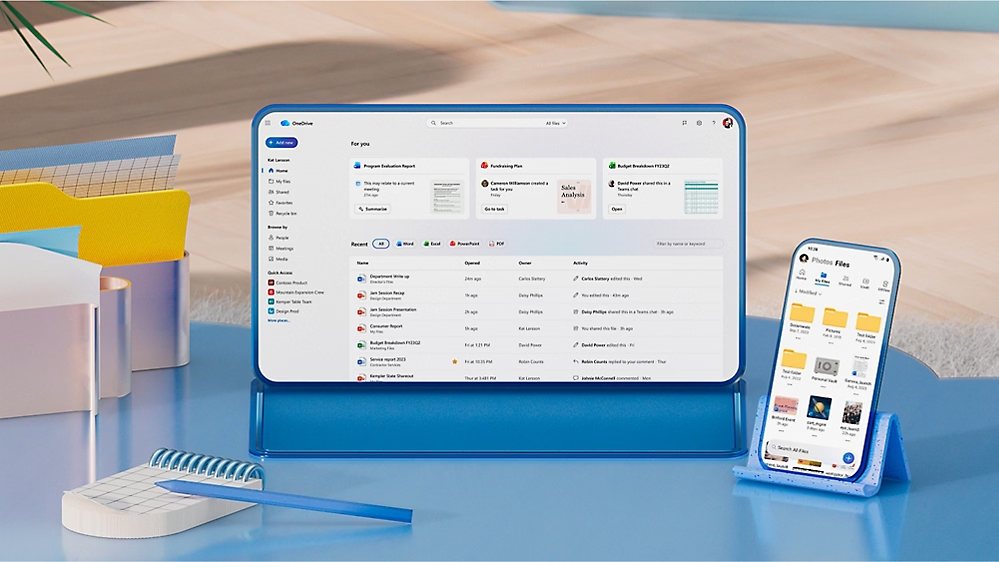
Store, edit, and share documents and photos, from anywhere, on all your devices, with OneDrive.
Streamline access to content, information, and processes with teams sites on SharePoint.
Help users find files and documents, internal sites, people and groups, and conversations with Microsoft Search.
Help employees discover and share learning content from company and partner libraries with Viva Learning.
Build relationships at work by giving employees a place to connect and express themselves with Viva Engage.
Empower employees with data-driven, privacy-protected insights and wellbeing experiences through Viva Insights.
Connect employees with a modern company-branded experience for news and resources in SharePoint.
Create rich, conversational chatbots with the Microsoft no-code interface solution, Copilot Studio for Teams.2
Simplify and speed up business processes with Microsoft 365 Copilot Chat and AI agents.
Connect custom apps to data stored in different Microsoft 365 services with Microsoft Graph.
Quickly build custom business apps for web and mobile—no coding required—with Power Apps for Microsoft 365.
Build automated workflows to get notifications, sync files, and collect data with Power Automate for Microsoft 365.
Build custom apps, bots, workflows, and dashboards within Teams by using Dataverse for Teams.2
Get insights into how your organization uses Microsoft 365 with Microsoft Adoption Score.
Get insights into your organization's security posture across Microsoft 365 workloads with Microsoft Secure Score.
Explore featured plans
Compare a similar plan so you can pick the one that works best for you.
Microsoft 365 Business Standard
$14.00
user/month, paid yearly
(Annual subscription–auto renews)
Apps and services included:
Microsoft 365 Business Standard with Copilot
$23.50
user/month, paid yearly
(Annual subscription-auto renews)
Apps and services included:
Microsoft 365 Business Standard (no Teams)
$10.79
user/month, paid yearly
(Annual subscription-auto renews)
Apps and services included:
Microsoft 365 Business Standard with Copilot (no Teams)
$20.30
user/month, paid yearly
(Annual subscription-auto renews)
Apps and services included:
Pricing as of August 2026 and subject to change. Request a quote for reseller pricing.
Enhance your Microsoft 365 experience
Frequently asked questions
Microsoft 365 Business Basic, Business Standard, Business Premium, and Microsoft 365 Apps for business, or versions of these plans, support a maximum of 300 users. If you have more than 300 users or think you will soon, see our enterprise plan options.
An email domain is the part of an address after the “@” that identifies your organization—like @yourbusiness.com. It’s used to create professional email addresses and connect your Microsoft 365 services to your business identity. A domain is essential for setting up your organization’s identity and enabling core services, like email, Teams, and SharePoint. Here’s why:
Create and manage user accounts: Domains are used to generate email addresses (e.g., [email protected]) and organize users across Microsoft 365 apps.
Have a professional business email: A domain allows you to send and receive emails using your business name, which builds trust.
Promote your brand and build trust: You can connect your own domain to personalize your environment and reinforce your brand identity.
If you don’t have a custom domain yet, Microsoft provides a default one (e.g., yourbusiness.onmicrosoft.com) so you can still use all features during your trial.
When you sign up for Microsoft 365, Microsoft provides a default domain ending in .onmicrosoft.com (e.g., tailspintoys.onmicrosoft.com). This is called your fallback domain, and it’s automatically used if you don’t own or connect a custom business domain. The fallback domain is used for:
Usernames and email addresses: It forms the basis of your Microsoft 365 identity (e.g., [email protected]).
Teams and group aliases: It powers collaboration tools like Teams, SharePoint, and Outlook groups.
Email routing and continuity: If your custom domain (e.g., @contoso.com) is removed, the fallback domain ensures email delivery continues without disruption.
In contrast, a business domain is one you own (like @yourbusiness.com) and connect to Microsoft 365 to personalize your setup, reinforce your brand, and use professional email addresses.
Install Microsoft 365 apps on up to five desktop computers, five tablets, and five mobile devices. Hybrid Windows devices, such as the Microsoft Surface Pro, count as either a PC or a tablet.
Microsoft 365 Business Basic provides lightweight web and mobile versions of apps including Word, Excel, PowerPoint, and Outlook that are accessible online. Microsoft 365 Business Standard, Business Premium, and Microsoft 365 Apps for business provide installable desktop applications that can be used offline.
With OneDrive, access your file storage when you’re offline. When you make changes while offline, they’ll be synced to OneDrive and across the rest of your devices when you reconnect. With Outlook, you can read emails already delivered to your inbox, or draft new emails and meeting requests. Your inbox and outbox will sync across the rest of your devices when you reconnect.
Host online meetings and video calls for up to 300 people with Microsoft 365 Business Basic, Business Standard, and Business Premium subscriptions that have a Microsoft Teams license. You can also choose between plans with and without Copilot to get deeper integration and extensibility.
This limit increases up to 1,000 people with Microsoft 365 E3 and E5, Microsoft 365 A3 and A5, and Microsoft 365 G3 and G5 subscriptions that have a Microsoft Teams license.
If the hardware you run today uses Windows 8 Pro or later, it likely meets the minimum requirements for Microsoft 365. For Microsoft 365 Business Premium, check the Windows 11 system requirements to ensure your devices are eligible for the upgrade, or download the PC Health Check app to see if your PC can run Windows 11.
We take strong measures to help protect customer data from unauthorized access or use, either externally or internally, and to prevent customers from gaining access to each other’s data.
Footnotes
1. Microsoft Teams-integrated features require a Teams license to enable but can be used without Teams via web or other in-app experiences.
2. Microsoft Teams license required.
3. Availability of mobile apps varies by country/region.
4. Microsoft 365 Copilot may not be available for all markets and languages. To purchase, customers must have a qualifying plan.
What we do alongside the licence
SoftSolutionWorks.com is backed by BlueAlly, an authorized Microsoft reseller. As well as supplying the licences, we can help you choose the plan, deploy it, and finance it.